Showing posts with label Script. Show all posts

Wednesday, 3 June 2015

Blender Set Origin Script

I have not done much work on my game recently but to do so I need to get round to creating the levels and I'm back to using Blender again.

When I started to tidy up one of my models I came across an odd feature in Blender. You can only set the origin on the active object.

My main reason for setting an origin is to get all of the origins of all of the objects in a scene at the zero point. I find it easier to import in to other programmes and line them up if they all have the same centre.


Using the built in button, it is frustrating having to select one object at a time to set all the origins. I decided to create a script to do this for me.

Not as easy as I expected because even in code the set origin only works on the active object.


I just typed the lines in to the console to run it. After the last line press return one extra time to run it.


for item in bpy.context.scene.objects: 
 if item.type == 'MESH': 
  item.select = True 
  bpy.context.scene.objects.active = item 
  bpy.ops.object.origin_set(type='ORIGIN_CURSOR') 
  item.select = False


The above worked in version 2.74 of Blender. It goes through ALL objects in the scene which is what I wanted.


for item in bpy.context.selected_objects:
 if item.type == 'MESH': 
  bpy.context.scene.objects.active = item 
  bpy.ops.object.origin_set(type='ORIGIN_CURSOR') 


In theory the above should work for the currently selected objects but I have not tested that script.


I came across another oversight when trying to copy that code to save it. To get the Windows Ctrl-C (copy) and Ctrl-V (paste) to work in the console window you first have to click on the console menu item at least once. After that Ctrl-C and Ctrl-V work as expected.

Saturday, 30 July 2011

Python Scripting Distraction

Early on this week I received an e-mail from one of the lead developers for Blender asking me to test the latest pre-release Official FBX exporter with XNA.  He had done some work recently using bits of my XNA specific exporter and wanted to know if the official one was now compatible with XNA.

It was not compatible but I had always intended to merge the two in to one unified exporter so I spent the week doing that.

If you are interested all the source code and lots of notes are available by following these two links:

Its done now and the patch has been accepted.  The next release of Blender (2.59) will only need one FBX exporter and XNA will be supported by that official Blender FBX exporter.

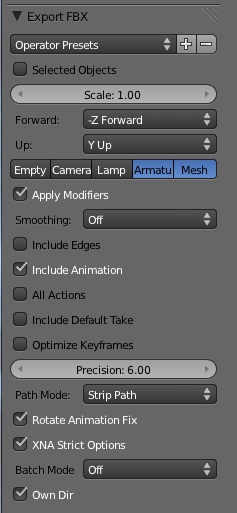
It is not quite as user friendly as my current scripts because there are several tick boxes to select to output in the correct format for XNA. 


There is a convenient 'XNA Strict Options' tick box which forces the options to be compatible with XNA.  It is not required but is handy.

If you select the options manually the following are required:
  • Set the scale to 1.0 (which is is by default.)
  • Use the 'Rotate Animation Fix' (essential otherwise animations are a mess!)
  • Turn off, Empty, Camera and Lamp (makes the file size smaller)
  • Turn off smoothing (might not be necessary but I have not tested that yet.)
  • Do not include edges (makes the file smaller and can avoid some import errors)
  • Turn off optimized keyframes (not essential but might remove a duplicate keyframe that was added deliberately!)
  • Do not include default take (can be tricky to merge animations if they are all named 'Default_Take'!)
  • Select the 'Strip Path' mode so the uv textures use the same folder as the FBX file. (easier to manage the files.)
  • Enable Armature included as bone.  (This is the most important option to select.)

Further instructions are on the Blender Wiki:
http://wiki.blender.org/index.php/Extensions:2.5/Py/Scripts/Import-Export/Autodesk_FBX
I'm now going back to my .NET C# code.  So after spending days working in Python and remembering not to end each line with a semi-colon, I now have to remember to put the semi-colon in!

I much prefer C# with the structured code, type explicit variables (I avoid 'var' in .NET) and most importantly Visual Studio's auto complete and syntax suggestions all built in.  Happy coding.

Tuesday, 30 November 2010

Blender 2.5 to XNA 4 animated FBX models

The following post is out of date because as from Blender 2.56 the scripts mentioned are all shipped with Blender. See the following post for more up to date information:
http://blog.diabolicalgame.co.uk/2011/07/exporting-animated-models-from-blender.html


==


Following on from my previous post on this subject I have managed to create an FBX exporter script for Blender 2.55 Beta that works with keyframe animations and imports in to XNA 4.0.

Due to the limitations with the Autodesk FBX importer that ships with XNA 4.0 the animations need to be loaded individually from separate FBX files but there are simple solutions available to work with that.  Details and other links are in the Instructions with each of the following projects:

The package with several XNA FBX exporters for Blender 2.5 can be downloaded from:
http://code.google.com/p/blender-to-xna/
The most recent instructions are on the Blender Wiki:
http://wiki.blender.org/index.php/Extensions:2.5/Py/Scripts/File_I-O/Blender-toXNA

An XNA model viewer that has an option to load FBX files as separate animations:
https://code.google.com/p/take-extractor/

The XNA TakeExtractor project also demonstrates how to rotate models and their animations within the pipeline.  That is useful for adjusting Blender models which face Z up to XNA's default which is Y up.  Use a rotation while loading of X = 90, Y = 0, Z = 180.   I think that ends up facing backwards because that is how my entire game appears to work and there is too much code for me to bother to change it!

Friday, 26 November 2010

Blender 2.5 to XNA 4 animated model pipeline

See the future linked post for more up to date information:
http://blog.diabolicalgame.co.uk/2011/07/exporting-animated-models-from-blender.html

The following is a bit out of date. If you want to know how to get models from Blender to XNA read the above linked post not this one.

==

It's been a while since I posted because I have been struggling with a problem since I finished the conversion to XNA 4.

As mentioned in my previous post, animated models from Blender would no longer display properly in XNA.  If I had imported the animation in XNA 3.1 they would still work in 4.0 but when I tried to save new animations from the models using XNA 4, the animations were distorted.

I tried fixing the FBX exporter from Blender but the FBX file format is not documented making it difficult.  To cut a long story short I have ended up with a solution that uses separate files for the animations.

The model, bones and bind pose are loaded in to XNA using FBX.  Each animation is exported from Blender as a list of bone transform matrices.  Those can then be imported in to XNA and converted to the AnimationClip format used by the Microsoft Skinning Sample.  Edit:  I now have FBX working see my next post.

The process takes a few steps but works with the models I have been using.  It needs more testing with other models.


The package with several exporters for Blender 2.5 can be downloaded from:
http://code.google.com/p/blender-to-xna/
The most recent instructions are on the Blender Wiki:
http://wiki.blender.org/index.php/Extensions:2.5/Py/Scripts/File_I-O/Blender-toXNA

The XNA sample and model viewer demonstrating how to import the animations can be downloaded from:
https://code.google.com/p/take-extractor/

Both are on Google Code, if the links do not initially work, wait an hour and try again.  Google appear to have frequent outages but none so far have lasted longer than an hour.
There are still several limitations with the pipeline some are the same limitations as with earlier versions of XNA and Blender:

- All parts (Blender Objects) of a model must have the same centre (Origin, ideally at Zero)
- All parts of the model must have a scale of 1.0
- Every vertex must be weight painted or added to the bone vertex group for animation.
- The model has to be loaded in XNA before the animations can be converted to AnimationClip format.

At the moment the animations cannot be rotated in the content pipeline! [Fixed, see future posts]  My next job is to work out the maths to rotate the animations as they are imported.

==

Please make sure you read my future posts. I have done a lot more work to get it all working properly.